

QR code menu with photos for restaurants, cafés, shops and salons Your menu, beautifully seen.
Customers scan the code and see your items and prices at once. Set it up yourself, from your phone.
- Menu with photos
- WhatsApp and calls
- Location and hours
- Socials and reviews
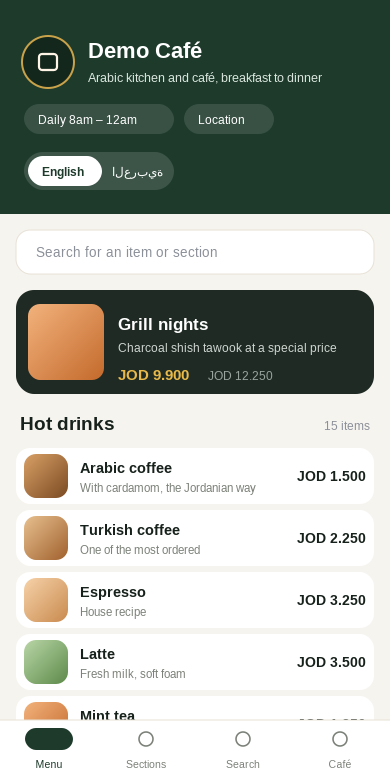
A live demo menu, as your customers see it. Open the demo menu
A QR menu and business page, on every customer’s phone.
QRWindow is a QR code menu (digital menu) with photos for restaurants, cafés, shops and salons in Jordan and the Gulf. You add your items with photos and prices and print a QR code for the table. Customers scan it and the menu opens on their phone, with no app and no account. QRWindow takes no orders and no payments: people look, then order from you directly.
Make your QR code menu in three steps, from your phone.
- 01
Add your items
Name, price and a photo from your phone.
- 02
Print your code
A ready table card, with a code you never reprint.
- 03
Your customer looks
They scan and see the menu with photos, in Arabic or English.

 qrwindow.com/q/…
A QR menu for restaurants, cafés, shops and salons
Cafés
Drinks and snacks with photos, and today’s offer up front.
Restaurants
Dishes with photos and prices, and sold out marked in one tap.
Shops
Show your products and prices; customers message you on WhatsApp.
Salons
Your services and prices, with your location and opening hours.
QR menu, paper menu or PDF?
| Printed and PDF menus | QRWindow |
|---|---|
| Printed: change a price and you reprint. | Edit from your phone; the printed code stays. |
| PDF: a heavy file you pinch and zoom. | A light mobile page, names and prices before photos. |
| Neither has WhatsApp, location or hours. | All of it on the same page. |
One link for your menu, WhatsApp, location, hours and reviews.
Next to the menu, a page for your business with all of it: call and WhatsApp in one tap, your location and opening hours, every social account, Google reviews and delivery links. One code on the table instead of a link for everything. The same page opens from a link you put in your Instagram bio or send on WhatsApp.
- Call
- Location and directions
- Opening hours
- IGInstagram
- TTTikTok
- SCSnapchat
- FBFacebook
- XX
- YTYouTube
- Your website
- Google reviews
- Delivery apps
Every field is optional; empty ones stay hidden.
Everything you need, nothing you don’t.
Your photos, moving
Your real photos move gently; the photo itself never changes.
Sold out? One tap
And it comes back at midnight on its own.
Arabic and English
A page for each language you add, right-to-left and left-to-right.
Your offers up front
Put your offers in the right place, on a schedule you pick.
Search and two taps
Customers reach any item in two taps, or search for it.
Fast on a weak signal
Names and prices show before the photos.
All your branches
Each branch with its own code and prices, on Pro.
A code that stays
Change your name or prices; your printed code stays the same.

Your business, through the window.
Customers see your best before they walk in: your items with photos and prices, neat and beautiful.
Simple, clear plans
Start with a free 7-day trial of Growth, no card needed.
Starter
For a small place that wants a clear photo menu.
$15 a month
$144 a year$12 a month
- Up to 150 items in 30 sections
- 2 photos per item
- 1 active offer
- 1 branch
- 1 GB for photos and video
- Your free trial starts here
Growth
For a restaurant or café that wants video and more offers.
$25 a month
$240 a year$20 a month
- Up to 500 items in 75 sections
- 5 photos per item
- Short dish videos (up to 30)
- 5 active offers at a time
- 1 branch
- 5 GB for photos and video
Pro
For several branches and a large menu.
$49 a month
$468 a year$39 a month
- Up to 2,000 items in 200 sections
- 10 photos per item
- Short dish videos (up to 100)
- 50 active offers at a time
- 3 branches, more when you need them
- 20 GB for photos and video
No card needed · Prices are in US dollars.
QR code menu: common questions
Can customers order or pay through the menu?
No. QRWindow shows your menu with photos and prices and your business details; customers order and pay with you directly, as usual.
What is a QR menu?
A digital menu customers open by scanning a QR code with their phone camera, instead of a paper menu. You can update it any time.
How do I make a QR code menu for my restaurant or café?
From your phone: add your items with names, prices and photos, then print the table card with its QR code. Customers scan it and the menu opens.
Is the QR menu free?
You can try QRWindow free for 7 days with no card; after that it is a paid plan.
Do customers need an app?
No. Customers scan the QR code with their phone camera and the QRWindow menu opens, with no app and no account.
Is it the same as a “barcode menu”?
Yes. Many people call it a barcode; the correct name is a QR code. Any recent phone camera reads it.
If I change prices or my name, do I reprint the code?
No. Your QRWindow code is permanent, and changes show to customers at once.
Is the menu in Arabic and English?
Yes. Once most of your item names are in English, an English page appears and customers choose the language.
Do I need a tablet or special device?
No. You set up and edit the menu from your phone, and customers open it on theirs.
Can I put my menu link in my Instagram bio and WhatsApp?
Yes. Your business has a link to its menu and page; put it in your bio or send it on WhatsApp. It opens the same page as your table code.
Can I add my Google Maps location and Google reviews?
Yes. Add your map link and your Google reviews link and they show as buttons on your page.
Does it suit salons, barbers and shops?
Yes. Show your services or products with prices, plus WhatsApp, location and opening hours.
How do I contact QRWindow?
Email us at [email protected].
Can you set up the menu for me?
Yes, if you’re busy. Create your account, then ask for “We set up your menu” in your dashboard and send photos of your menu and items: we enter up to about 40 items, write the sections and descriptions in Arabic and English, and have it ready within 48 hours of payment being confirmed, with one round of changes. It’s $75 one time, and we arrange payment with you on WhatsApp. Most owners set it up themselves, for free.